Staying in touch with your users shouldn’t stop when they close the app. With Firebase Push Notifications in AppLikeWeb, you can instantly reach users with updates, offers, and important alerts – delivered straight to their devices in real time.
What this integration gives you
With the new Firebase integration, your AppLikeWeb apps can:
- Send real-time notifications – keep users informed about new content, features, or status updates the moment they happen.
- Boost engagement & retention – bring users back into the app with relevant, timely messages instead of hoping they return on their own.
- Deliver targeted messages – use Firebase’s targeting options (topics, segments, user properties) to speak to the right audience, not everyone at once.
- Support time-sensitive events – send alerts about expiring offers, scheduled maintenance, or critical events that users shouldn’t miss.
How it works with AppLikeWeb
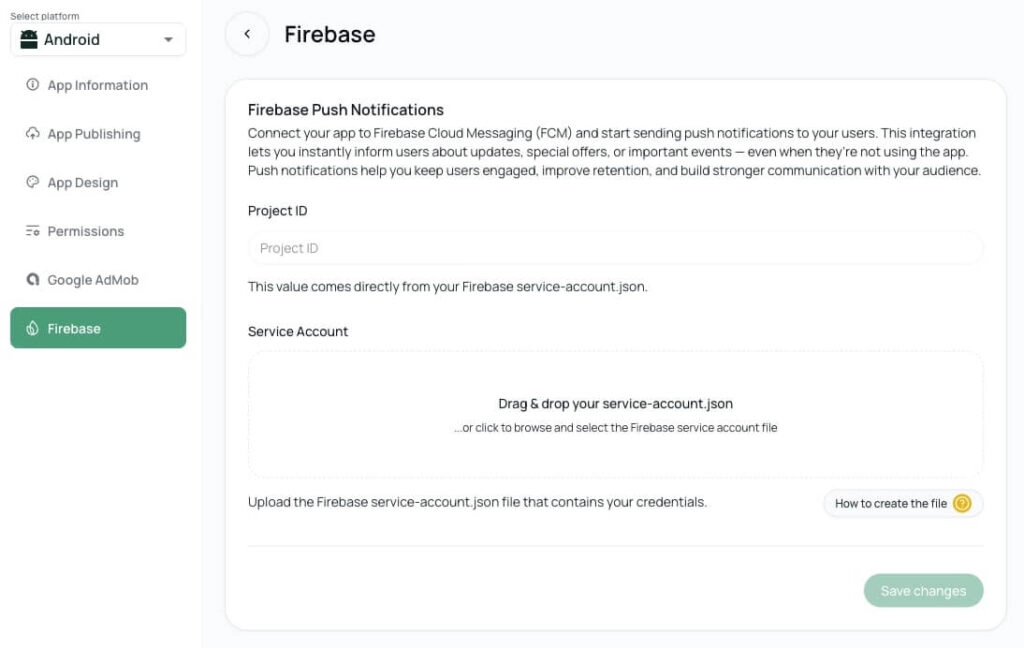
The Firebase integration is designed to be simple and flexible:
- Connect your Firebase project
Add your Firebase configuration to AppLikeWeb and link your app with Firebase Cloud Messaging (FCM). - Enable push notifications for your app
Turn on push support in your AppLikeWeb app settings. Your app will be ready to receive notifications from FCM. - Send notifications from your backend or tools
Use your existing backend, Firebase console, or automation tools to send messages via FCM to your AppLikeWeb app users.
You keep the full power of Firebase Cloud Messaging, while AppLikeWeb takes care of the app side and delivery.
Typical use cases
Here are just a few ways teams are using Firebase Push Notifications with AppLikeWeb:
- New feature & release updates – tell users what’s new and drive them back to explore it.
- Promotions & campaigns – send special offers, discounts, or limited-time deals.
- Account & system alerts – inform users about important changes in their account, billing, or app status.
- Re-engagement flows – win back inactive users with reminders, tips, or personalized messages.
Start using Firebase Push Notifications
If you already have a Firebase project, you’re just a few steps away from push notifications in your AppLikeWeb app.
Connect Firebase in your settings, enable push for your app – and start sending notifications that keep your users active, informed, and engaged.